Gamblezen Casino Login for UK Players: Sign In and Fix Access Issues
Gamblezen Login for players in United Kingdom in 2026. Read the offer and start playing today. Updated by our editors. Verified data only. No small print surprises.
- 12,000+ games
- Coins & shop rewards
- 18+ only

Gamblezen welcome pack and extra offers
Gamblezen: welcome bonus for new players
- quick registration
- mobile-friendly
- fast payouts
Getting a Gamblezen account running
Create an account
Fill the form and confirm your email.
Make a deposit
Choose a method and confirm the payment.
Claim the bonus
Enter the promo code before the first deposit.
I walk through the Gamblezen Casino login for UK players in 2026: what to prepare, the sign-in steps, and how returning login differs from registering and claiming the welcome offer.
Sign In to Your Gamblezen Account in Under a Minute
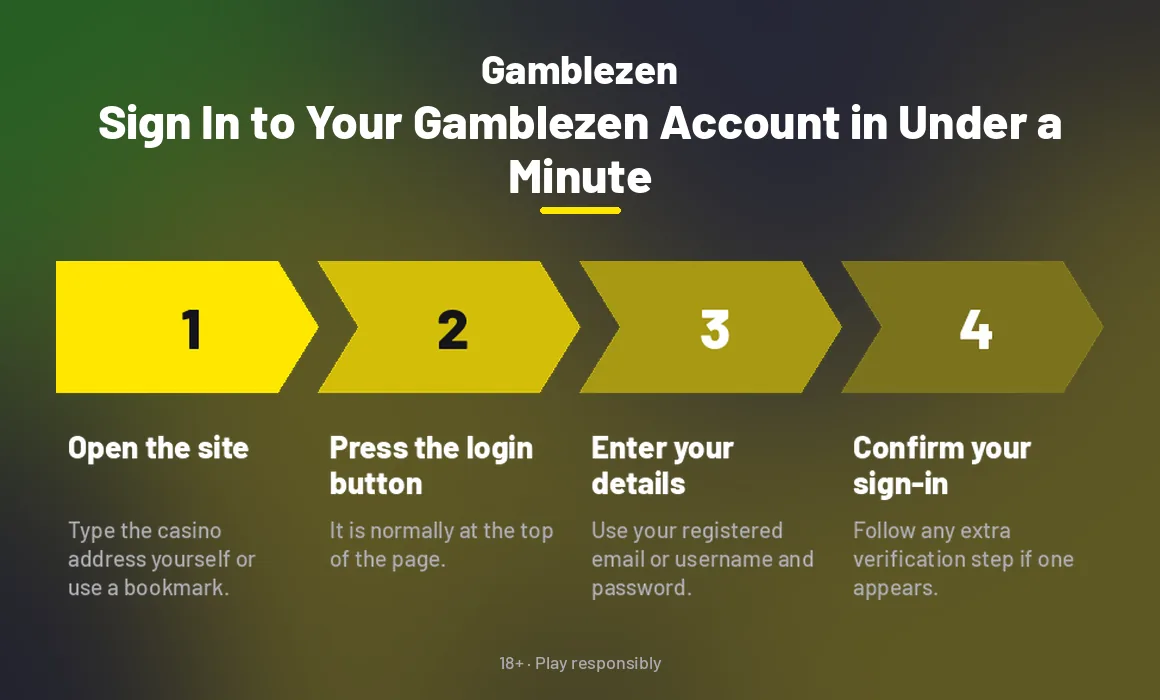
To log in, open the gamblezen site, press the login button in the header, enter your registered email or username and your password, then confirm. Once the details are accepted, you land in your account and can reach the cashier and your game lobby. Most returning players finish this in well under a minute.
Here is the flow I follow with Gamblezen Casino, described generically because screen layouts change:
1. Type the casino address into the browser yourself, or use a bookmark you saved earlier, rather than following a link from an email or message.
2. Check that the address matches exactly and that the padlock shows in the address bar.
3. Press the login button, normally at the top of the page.
4. Enter your registered email or username and your password.
5. Submit the form and follow any extra verification step if one appears.
6. After a successful sign-in, check the account area to confirm it shows your own details.
Before I type a password, I always read the web address twice. Look-alike domains are a common trap, and a password entered on a copycat page is as good as handed over.
What to Have Ready Before You Log In
I keep this short checklist to hand so I don't fumble at the login form:
- The email address or username you registered with
- Your password, ideally from a password manager rather than guessed from memory
- Access to the registered email inbox or phone, in case a verification step or password reset is needed
If you are unsure whether an account exists, I recommend confirming that first instead of trying several times in a row. Repeated failed attempts can lock an account or trigger extra security checks. If a login keeps failing, use the password reset option rather than guessing.
No Account Yet? How Login Differs From Registration
Login is for players who already have an account; registration is the one-off step that creates it. If you have never signed up, the login form will not help, and you need to complete the gamblezen registration first.
The welcome package is 100% up to £500 plus 200 free spins, with a minimum deposit of £20. It is claimed with a deposit, so it does not appear simply because you logged in.
My own order is to register first, then read the bonus terms in full before depositing anything. Gambling is for adults aged 18 and over, carries a real risk of loss, and is best treated as entertainment. Decide your limits before you play.
Can't Log In? Fixes for the Most Common Problems
Most login failures at Gamblezen come down to a mistyped password, an unrecognised email, a locked account or stale browser data. I work through them in a fixed order: try the password reset first, then clear the browser cache, then contact support using the registered email address.
| Symptom | Likely cause | What to do |
| "Wrong password" message | Typo, caps lock or an old saved password | Retype slowly, then use the password reset |
| Email not recognised | Registered with a different address or a username | Try other addresses you use, or sign in with your username |
| Page reloads or form will not submit | Cached data, cookies or a browser extension | Clear the cache, disable extensions or try another browser |
| Account locked after several attempts | Security protection after failed logins | Stop retrying and contact support |
| Login works but cashier is blocked | Incomplete KYC checks | Complete verification when asked |
The support page or account terms list any lockout thresholds and response times, so I check there rather than assume a figure.
How to Reset a Forgotten Password
Resetting is quicker and safer than guessing. Here is what I do:
1. Open the login page and choose the forgotten password option.
2. Enter the email address you registered with.
3. Open your inbox, find the message and follow the link inside it. Check the spam folder if nothing arrives.
4. Set a new password and confirm it.
5. Log in with the new details.
For the new password, I choose a long, unique one that I have not used on any other site, ideally from a password manager. Avoid birthdays, names and obvious patterns.
Account Locked or Restricted: What It Usually Means
A restriction is not always a punishment. In general, the common reasons are repeated failed login attempts, verification that is still incomplete, or a self-exclusion or cool-off period you set earlier. Operators also run KYC (know your customer) checks, which confirm your identity and age before certain actions, such as withdrawals, are allowed.
I will not guess at Gamblezen's internal rules. The next step is to contact support from your registered email, say what you see on screen and ask which reason applies. If you chose self-exclusion, the restriction is there to protect you, so do not try to work around it.
Keeping Your Login Safe: SSL, Passwords and Phishing
SSL encrypts the connection between your browser and the site, which protects your login details in transit. I check for the padlock in the address bar before typing anything. SSL does not protect you from weak passwords or fake pages, so those remain your job.
Gamblezen Casino relies on SSL for the login session, but the habits below are in your hands:
1. Check the padlock and read the full web address before entering any details.
2. Never log in from a link in an unsolicited email, text or social message. I always type the address or use my own bookmark.
3. Use a unique password that you do not reuse on other sites.
4. Keep your device and browser updated, and avoid logging in on shared or public computers.
5. Log out when you finish, especially on devices other people use.
6. Be wary of anyone asking for your password. Genuine support never needs it.
A fake login page usually gives itself away through a slightly altered web address, spelling errors or an urgent message pushing you to act. If something feels off, I close the page and go to the site directly.
Identity checks are a separate matter. KYC verification happens after registration and confirms who you are. It is not a replacement for a strong password, but it does help protect your account and your withdrawals.
RNG, or random number generator, is a fairness feature that governs game outcomes. It has nothing to do with login security, so I treat it as a separate topic.
Set deposit limits before you play.
Why Verification (KYC) Appears After You Sign In
KYC, short for know your customer, is an identity check that UK-facing casino accounts normally include. It is typically requested before a first withdrawal or when the operator needs to confirm your age and identity. I would rather expect it than be surprised by it.
Once you are signed in, the account area shows your current verification status, so I check there first instead of guessing. I do not promise any timeline for approval, because that depends on the operator and on how clear your documents are.
Verification sits alongside other protections. SSL secures the connection while you log in, and KYC confirms who is behind the account. RNG is a separate fairness feature for game outcomes and has no role in identity checks. For licensing details, I look at the licence line in the site footer rather than relying on third-party claims.
My own habit is to upload documents early rather than wait for a first withdrawal. That way a request for extra information does not hold up money I have already decided to cash out.
Documents to Prepare in Advance
Operators commonly ask for the following, though the exact list can vary:
- Photo ID, such as a passport or driving licence
- Proof of address, such as a recent utility bill or bank statement
- Proof of payment method, if requested
For image quality, I make sure every corner of the document is visible, the text is sharp and readable, and nothing is cropped or covered by glare. The name and address should match your account details exactly.
Logging In on Mobile Browser vs App
You can sign in to Gamblezen through a mobile browser or through the app, using the same account details. The browser needs no installation, while the app gives faster access from your home screen. I start with the browser and move to the app only if I log in daily.
| Aspect | Mobile browser | App |
| Installation | None needed | Requires a download and setup |
| Storage on device | No extra space used | Uses some device storage |
| Convenience | Open the site or a bookmark each time | Opens from an icon on your device |
| Account details | Same registered email or username and password | Same registered email or username and password |
| Updates | Always the current site | May need periodic updates |
I do not make claims about app features beyond what the operator confirms, so check the app page for current details. If you decide the app suits you, the gamblezen app download page covers installation.
Whichever route I use, I check the web address and padlock in the browser, and I avoid logging in on shared devices.
Set Your Limits Right After You Log In
Deposit limits and self-exclusion are tools for keeping gambling under control, and I treat setting them as the first action after logging in. Gamblezen Casino requires players to be 18+. I recommend setting a deposit limit before making a first deposit.
The account settings or the support page explain which limit options are available and how to activate them. I do not quote amounts or menu paths here, because they can change and I cannot confirm them.
Here is what I look at once I am signed in:
- Deposit limits: a cap on how much you can add to your account over a set period. I choose a figure I could lose without it affecting rent, bills or savings.
- Self-exclusion: a block that stops you from playing for a chosen period. If you feel your play is getting out of hand, use it, and do not try to get around it.
- Age check: gambling is strictly for adults aged 18+, and under-age play is not permitted.
If gambling stops being fun, or you are chasing losses, step away and talk to someone. GamCare is an independent UK charity offering free, confidential support and information for people affected by gambling.
Remember that gambling carries a real risk of losing money and should be treated as entertainment, never as a source of income. Once your limits are in place, you can read the gamblezen welcome bonus terms calmly before deciding whether to deposit.
Before You Deposit: A Quick Checklist for Logged-In Players
Before depositing at Gamblezen, I confirm the web address, password strength, verification status, limits and bonus terms. The welcome package is 100% up to £500 plus 200 free spins, with a minimum deposit of £20, and it requires a deposit to claim.
Here is the checklist I run through:
1. The web address is correct and the padlock shows in the browser.
2. My password is unique and not reused elsewhere.
3. My verification status in the account area is clear, and any requested documents are uploaded.
4. A deposit limit is set, and I know how to use self-exclusion if needed.
5. I have read the welcome bonus terms in full, including the minimum £20 deposit.
6. The amount I plan to deposit is money I can afford to lose.
I would not deposit until each item is ticked. If you would like to compare offers first, the gamblezen no deposit bonus page covers that option separately.
Who should not use it: anyone under 18, anyone who has self-excluded, and anyone who cannot afford to lose the money they would stake. Gambling is entertainment with a real risk of loss, not a way to earn income.
Questions and answers
Does Gamblezen Casino offer a no deposit bonus or promo code for UK players?
The welcome package confirmed for UK players is 100% up to £500 plus 200 free spins, and it is claimed with a deposit of at least £20, so logging in alone does not unlock it. Searches for no deposit codes and free spins promo codes often lead to third-party pages. For any current promotion, I check the bonus page inside the account and read the terms in full before depositing.
How long does a Gamblezen withdrawal take?
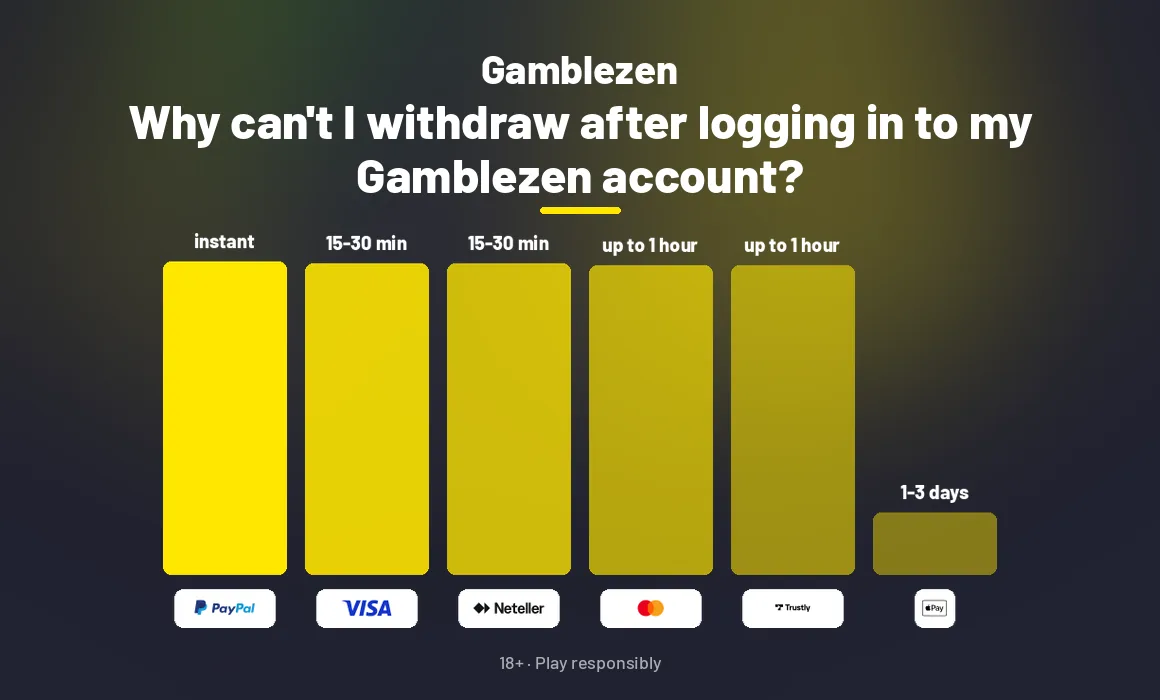
Withdrawal times depend on the payment method and on whether KYC verification is complete, so I do not quote a fixed figure. Uploading ID and proof of address before the first cash-out removes the most common delay. The cashier and the payments terms show the current processing times for each method.
Why can't I withdraw after logging in to my Gamblezen account?
The most common reason is incomplete KYC verification, which confirms your identity and age before withdrawals are allowed. The account area shows your current verification status, so I check there first. If documents are already uploaded and the cashier is still blocked, I contact support from the registered email and ask which requirement is outstanding.
Can I use the same Gamblezen login on mobile and desktop?
Yes. The same registered email or username and password work in a mobile browser, in the app and on desktop. The browser needs no installation, while the app opens from a home screen icon. On any device I check the web address and padlock before typing my details, and I avoid shared computers.
Is it a drawback that Gamblezen asks for KYC documents after I have already signed in?
It can feel like an extra hurdle, but verification is a standard identity and age check for UK-facing casino accounts. The trade-off is a delay if documents are unclear or incomplete, against better protection for your account and withdrawals. I upload a sharp passport or driving licence and a recent proof of address early, so a request does not hold up a cash-out.
Where can I check the licence behind Gamblezen Casino before I log in?
The licence line in the site footer is the place I look, rather than relying on third-party claims. It shows which regulator the operator states it works under. Before depositing, I read that line together with the terms and bonus conditions, and I confirm that I am 18 or over.
What should I do if I think I entered my password on a fake Gamblezen page?
Change your password straight away on the genuine site, typed in manually or opened from your own bookmark, and use a unique one not reused elsewhere. If you used the same password on other sites, change it there too. Then contact support from your registered email, explain what happened, and watch your account for activity you do not recognise.